
Neck Pain: A Modern Plague Linked to the Workstation
Neck pain is one of the most common disorders among people who work long hours at a workstation. A poorly adapted workstation is often the cause of muscle tension in the neck, shoulders, and upper back. These neck pains are frequently caused by improper posture. Fortunately, a few simple adjustments can prevent these discomforts and maintain good neuro-musculoskeletal health.
Why Does Your Workstation Cause Neck Pain?
A screen positioned too low forces you to tilt your head forward, which places excessive pressure on the cervical vertebrae and surrounding muscles. A poorly adjusted chair, lacking lumbar support or not set to the correct height, can also misalign the spine, compromising posture over the long term. Additionally, remaining in a prolonged static position without moving or taking regular breaks increases muscle tension and creates stress points in the neck and shoulders. Finally, inappropriate accessories, such as a poorly positioned keyboard or mouse, force repetitive movements or awkward postures, further exacerbating neck muscle tension.
These combined factors greatly increase the risk of developing torticollis, shoulder tendinopathies, or even elbow epicondylitis if no corrective measures are taken.
The Impact of Poor Ergonomics
Poor ergonomics can cause neck muscle tension, recurring eye fatigue, and persistent headaches. An inadequate posture, such as a forward-tilted head or slumped shoulders, puts continuous pressure on the cervical and thoracic spine. This prolonged pressure gradually limits neck mobility and can cause chronic stiffness. Without correction, these discomforts worsen over time and negatively affect concentration and productivity.
The Basic Principles of Good Office Ergonomics
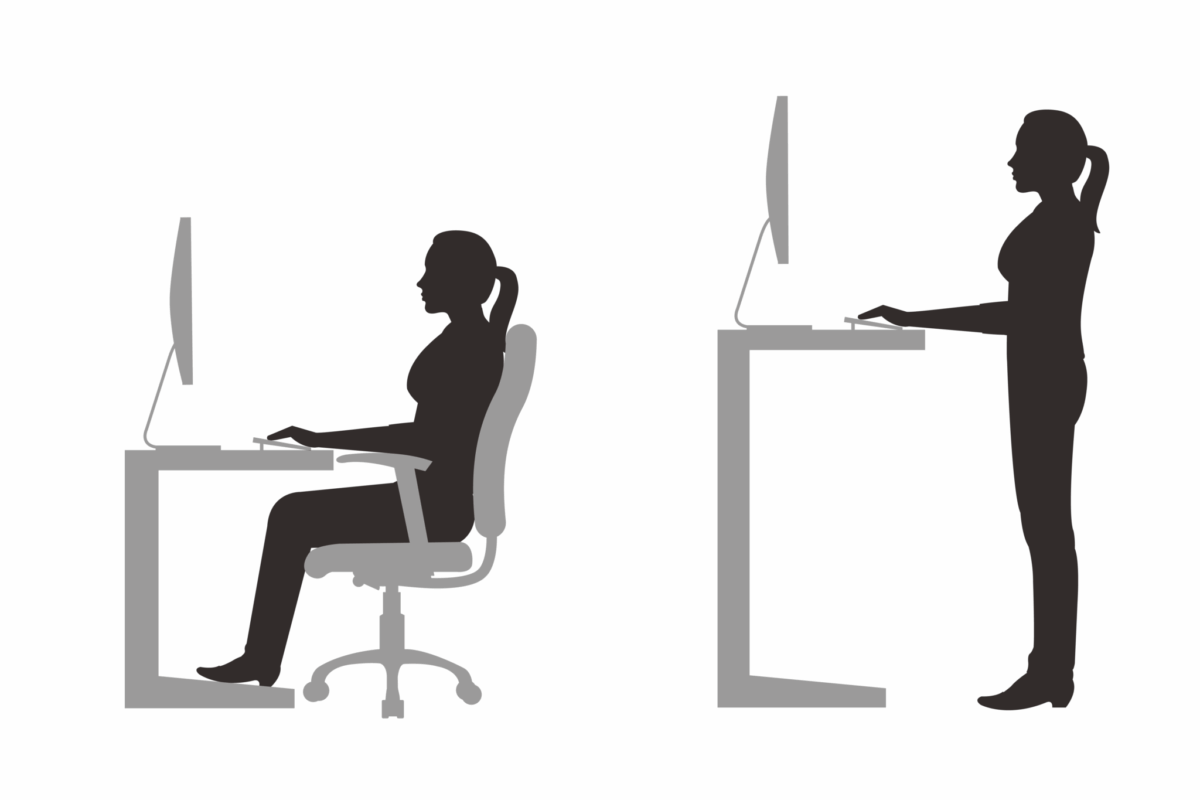
1. Chair Adjustment
Your chair is the foundation of your posture; it must:
- Support the lower back with an adjustable backrest;
- Allow feet to rest flat on the floor or on a footrest;
- Keep knees level with the hips;
- Have elbows close to the body and bent at about a 90-degree angle, forming a natural “L”;
- Shoulders should not be raised or tense.
2. Screen Position
The computer screen should:
- Have the top third at eye level;
- Be positioned about an arm’s length away;
- Allow keeping the head straight without tilting forward.
3. Desk Organization
- Keep the mouse and keyboard within easy reach;
- Use a document holder if you work with papers;
- Avoid twisting the body sideways to access accessories.
Practical Tips to Prevent Neck Pain
Prevent Neck Pain with a Dynamic Posture
Regularly changing position is essential. Staying still too long creates pressure points.
Consider:
- Alternating between sitting and standing positions
- Taking active breaks every 45 to 60 minutes
- Using an adjustable desk if possible
Effective Stretches Against Neck Pain
Some simple movements can be performed at the desk:
- Shoulder rolls
- Gentle head inclinations from left to right
- Seated self-lengthening
These gestures help release accumulated tension and stimulate circulation.
Adjust Lighting
Adjusting lighting is an often overlooked but essential aspect for comfort and health at work. Poorly positioned lighting can cause improper postures, like leaning toward the screen, which increases tension in the neck and shoulders. Favor natural light when possible, as it is gentler on the eyes and helps maintain a balanced circadian rhythm. If natural light is insufficient, opt for indirect lighting by using lamps positioned to avoid screen glare. Also, add an adjustable desk lamp for tasks requiring increased focus, such as reading or writing. These lighting adjustments can greatly improve posture and reduce visual fatigue.
When to Consult a Professional?
If pain related to posture or work becomes recurrent or begins to limit your daily activities, it is strongly recommended to consult a healthcare professional such as a chiropractor. They can thoroughly assess your posture to detect any musculoskeletal imbalances. Based on their observations, they can develop a tailored care plan aimed at correcting identified deficiencies, improving comfort, and preventing future complications. This approach not only relieves pain but also optimizes your overall well-being.
To learn more about our services, visit Services offered at the clinic or Chiropractors in Quebec.
Recommended Ergonomic Tools and Accessories
Useful Equipment
- Adjustable monitor stand
- Ergonomic chair with lumbar support
- Footrest
- Vertical mouse
- Mouse pad with wrist support
Common Mistakes to Avoid in Workstation Setup
One of the most common mistakes is placing the screen too low or too high, which forces the head to tilt constantly. This creates continuous neck tension. Another mistake is using a non-adjustable chair without lumbar support, which unbalances the entire postural chain. Also, many users do not use a footrest even when their chair height requires it. Finally, having the mouse too far away or a poorly positioned keyboard forces the arms to extend unnecessarily, increasing muscle tension.
Comparison Between Home and Office Workstations
The home office, often improvised, lacks suitable ergonomic equipment. It frequently includes kitchen chairs, inadequate tables, or suboptimal lighting. In contrast, companies generally have certified equipment and workstations designed for prolonged use. However, the freedom to organize at home often allows a greater variety of postures and more breaks. The ideal is to combine the best of both: appropriate equipment and flexibility.
Common FAQ About Neck Pain at Work
Are neck pains caused only by the screen?
Not only. Although a poorly positioned screen contributes to the problem, it is often a combination of ergonomic factors and poor postural habits that are the cause.
Should I consult a professional at the first signs of pain?
Yes. The earlier the pain is addressed, the better the chances for a quick recovery.
Are ergonomic adjustments enough to resolve the pain?
They are essential but often complementary to exercises and chiropractic follow-up.
Can I use cushions or towels to temporarily improve my posture?
Yes, while waiting to invest in better equipment, temporary solutions can help if properly positioned.
Conclusion: Prevention starts with action
Adjusting your workstation is not just about comfort—it is a true investment in your health. By adopting an ergonomic posture, moving regularly, and consulting when necessary, you not only prevent neck pain but also improve your overall well-being. Taking care of your posture will help you prevent long-term neck pain.
Take your health into your own hands today: contact a chiropractor near you or discover more tips on our blog.